How To…
This section describes how to perform various maintenance tasks when using RADIUSS Spack Configs. This includes considerations about using it as part of the RADIUSS Build Infrastructure and the RADIUSS Shared CI Infrastructure.
Update Spack, Uberenv, or RADIUSS Spack Configs
The RADIUSS Build infrustructure relies on three components to work properly: Spack, Uberenv and radiuss-spack-configs. The dependency scheme between those components is as follows:
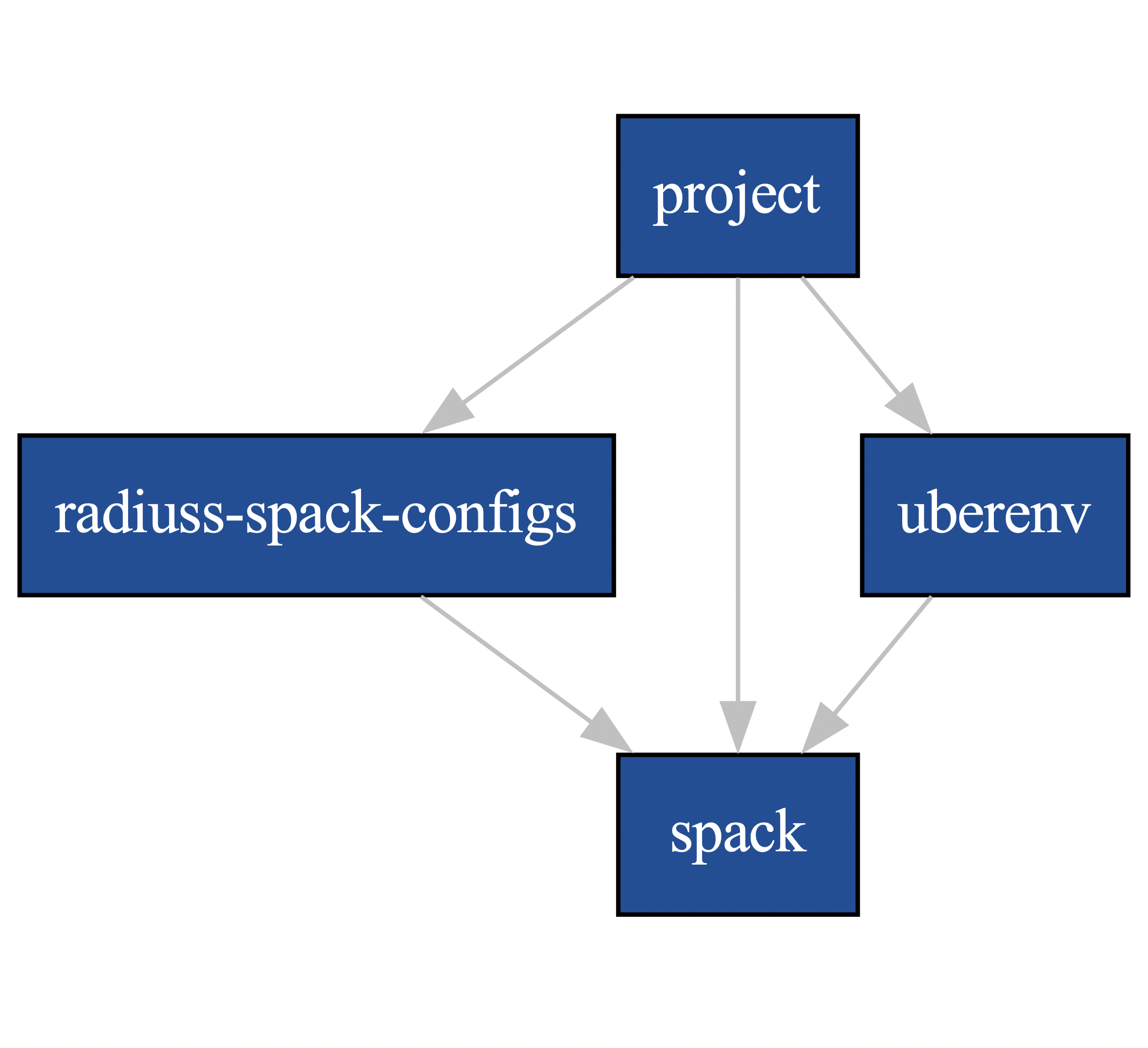
The dependency graphs helps anticipating the impact of a change. E.g., a change in Spack may require changes in Ubenv, radiuss-spack-configs, and the project itself.
Updating radiuss-spack-configs
Be aware of incompatibilities between Spack and radiuss-spack-configs versions. In radiuss-spack-configs, we use tags to mark changes in the required version of Spack.
Updating Spack
Spack may sometimes be updated without updating the radiuss-shared-ci project version. However, there are often changes in the Spack configuration formatting and options that will require you to update radiuss-spack-configs and Uberenv.
A typical source of issues is the introduction by Spack of breaking changes in the configuration files formatting or parsing. This has happen on a regular basis, and it is important to analyse the release notes to spot such a risk, and learn how to best address it.
Updating Uberenv
You should know that Uberenv may lag behind in terms of compatibility with Spack and updating to a newer Spack version may require modifications to Uberenv.
Project specific variants and dependencies
Projects often have build variants they want to test, but it does not make sense to include them in the shared configurations since they may not apply to other projects. Also, we want to keep the default Spack specs simple.
Example cases
For example, in Umpire there is +fortran and +openmp for RAJA. Those
variants cannot be shared via the RADIUSS Shared CI project because they are
likely not implemented or relevant to other projects.
Similarly, Umpire and RAJA may require a BLT version that depends on the system being tested. Such a requirement is not applicable to every project.
The solution
Variables PROJECT_<MACHINE>_VARIANTS and PROJECT_<MACHINE>_DEPS can be
set in the custom-variables.yml file to define a global variant or
dependency to apply to all the shared specs.
The flip side
If a you want to build a given shared spec without certain global variants or dependencies, you need to duplicate the original job from the radiuss-shared-ci project and remove those variables from the spec.
Note
You can keep the same job name and only the spec without global variants and dependencies will be built. Or you can rename it to build both specs.
Compare the build and CI configurations of two projects
Suppose you want to be in sync in terms of Build and/or CI configuration with another project. We summarize here the steps you should follow to make sure both configurations are exactly the same, or find the difference between them.
Reference used to import radiuss-spack-configs
In the .uberenv_config.json file in the top-level directory of a project,
the entry spack_configs_path should designates the radiuss-spack-configs
submodule. Check the status of this submodule to look for differences.
Note
The commit hash associated with a Git submodule in a project can be seen
by running the command git submodule status in the project.
The Spack configuration can affect the external packages to use, the default versions for a dependencies to build, etc.
Reference used by Uberenv to clone Spack
In the .uberenv_config.json file, the reference used to clone Spack can
be set with either spack_branch or spack_commit.
Note
It would be tedious to optain and hard to maintain coherent builds if the Spack versions were different between projects.
Local jobs (defined by the projects)
Compare each .gitlab/jobs/<MACHINE>.yml file between the two
projects and look for:
differences between jobs with the same name.
overridden jobs: if a local job has the same name as a shared job it will override the shared job.
jobs present only in one of the two projects.
List the Spack specs tested
RADIUSS Shared CI uses Spack specs to express the types of builds to test. We aim at sharing those specs so that projects build with similar configurations. However we allow projects to add extra specs to test project-specific configurations.
Shared specs for machine ruby, for example, can be listed directly in
radiuss-shared-ci:
cd radiuss-shared-ci
git grep SPEC ruby-build-and-test.yml
Extra ruby specs, specific to one project, are defined locally to the
project in .gitlab/ruby-build-and-test-extra.yml
cd <project>
git grep SPEC .gitlab/ruby-build-and-test-extra.yml
Use Uberenv
$ ./scripts/uberenv/uberenv.py
Note
On LC machines, it is following the good neighbor policy to do your build
step on a compute node. Here is an example command:
srun -ppdebug -N1 --exclusive ./scripts/uberenv/uberenv.py
Unless otherwise specified, Spack will default to a compiler. It is recommended
to specify which compiler to use by adding the compiler spec to the --spec=
Uberenv command line option.
Some options
--spec= is used to define how your project will be built. It should be the
same as a Spack spec, without the project name. For example:
--spec=%clang@9.0.0--spec=%clang@8.0.1+cuda
The directory that will hold the Spack instance and the installations can also
be customized with --prefix=. For example:
--prefix=<Path to uberenv build directory (defaults to ./uberenv_libs)>
Building dependencies can take a long time. If you already have a Spack instance
you would like to reuse (supplementing the local one managed by Uberenv), you
can do so with the --upstream= option:
--upstream=<path_to_my_spack>/opt/spack ...
Choose a Spack reference (commit or branch)
Uberenv needs to know which version of Spack to clone locally. The Spack
version used by a project can be found in the .uberenv_config.json file
in the top-level project directory.
In general, using the latest Spack release should be the default strategy. But things can quickly get complicated. Among the considerations for choosing a Spack version are:
Need for a newer Spack feature / fix.
Need for a newer package version, for example supporting the latest release of a given product.
Coherency with other projects.
Let’s consider the example of Umpire/RAJA/CHAI. Those projects work together and have synchronized releases. They all use Uberenv for their CI.
For those projects we try to:
Use the same Spack reference so testing behaves coherently across projects.
Use a Spack reference as new as possible, without changing it every month (for now).
Limit local patching of Spack packages.
Limiting local patching of Spack packages
Uberenv allows projects to duplicate any Spack package locally and patch it. It is important to limit the amount of patching, however. Every local patch creates a divergence between the developer / CI configuration and the one a project gets from the Spack repo.
Typical use cases for a local package patch include:
Test changes to the package that will be necessary for the next release.
Fix a bug, test a tweak in a toolchain configuration (we have seen the need for flags, or HIP / CUDA tweaks in the past).
In any case, those local changes should be pushed to upstream Spack as soon as possible. Typically, a project upstreams changes to its Spack package after a project release is done. This allows the new release tag/version to be included in the Spack package update.
Spack reference during the release process
As mentioned above, when a projects does a release, the release has to happen before it can be added to Spack.
Then, we want:
To limit the use of a local patch: after a release there should be no local patching needed.
To make sure we keep testing our code as close as possible to the user configuration: only the latest Spack package has the logic to build the latest release. (Most) users will want that.
For a project, that means we will have to update the Spack reference for Uberenv as soon as the Spack package has been updated.
Note
Upstream of the release, we might want to test the upcoming Spack package changes in spack@develop. In other words, we could anticipate the creation of a pull request in Spack and use it as a reference in Uberenv. However, it is not advised to create the release with this setting, because Uberenv now points to a PR in Spack that may disappear in the future.
In a nutshell
The chosen Spack reference used in Uberenv should evolve in time as follows:
After a project release, when the upstream Spack package gets updated, and Uberenv should point to the corresponding Spack merge commit.
Then, when a new Spack release comes out, it will have our latest changes and should be used as a reference.
Approaching a new release, Uberenv should point to the latest Spack release, but we might want to anticipate some testing with spack@develop, without merging that change.